Create Digital Music » Ableton Live 8 Creative Tutorial Videos: Using and Misusing Groove Extraction: "Ableton Live 8 Creative Tutorial Videos: Using and Misusing Groove Extraction
By Peter Kirn
Related: ableton, Ableton-Live, cdm-tv, groove, groove-extraction, inspiration, live-8, quantization, techniques, tips, tutorials, videos & more
Ableton Live 8 is here, and by now, you’re like familiar with some of its banner features. But we wanted to learn more about how features could be used in creative, new ways, or even misused. I sat down with Ableton’s Dennis DeSantis in the Ableton office here in New York to talk about some creative applications of new Live 8 features, starting with groove extraction and quantization.
Dennis is the right guy to consult when it comes to rhythm: he’s a talented composer, a classically-trained percussionist, and a founding former member of the ground-breaking Alarm Will Sound ensemble, which plays music from Varese to Aphex Twin. (Dennis himself was responsible for some of those Aphex Twin remixes.)
In part 1 of our 3-part series, Dennis looks at ways in which groove extraction can be used as a powerful dynamic quantization tool. That was always my hope for Live, going back to very early versions; it was incredibly frustrating that you had only limited, mechanical-sounding “swing” features that couldn’t be controlled. To some, Groove Extraction may simply mean copping specific grooves from samples, but it’s actually capable of dialing in a custom groove with real ease.
In part 2, Dennis shows how a similar technique can bring a simple percussion pattern to life, replicating the sorts of organic variations that happen with real players.
See also part 3 for alternative techniques with the Frequency Shifter – tune percussion with this effect instead of getting the usual metallic special effects.
These are “power features,” capable of a wide variety of results, but they’re also accessible enough that anyone could easily learn to use them. Have a look.
Incidentally, the audio is a bit odd as we recorded this on St. Patrick’s Day, and even twelve stories up, the shouts on the streets in Manhattan made it sound like the French Revolution was happening below us.
Subscribe to CDM TV: Our video series is now available via Blip.tv, so you can subscribe via:
iTunes (and watch on your iPod/iPhone, too)
Miro (the fantastic, all-platform video app)
RSS
We’ll soon have Internet Archive distribution, too. All CDM videos are now released under a Creative Commons license."
Monday, December 28, 2009

Friday, December 25, 2009
Create Digital Music » Ableton Live 8 Creative Tutorial Videos: Using and Misusing Groove Extraction
Create Digital Music » Ableton Live 8 Creative Tutorial Videos: Using and Misusing Groove Extraction: "Ableton Live 8 Creative Tutorial Videos: Using and Misusing Groove Extraction
By Peter Kirn
Related: ableton, Ableton-Live, cdm-tv, groove, groove-extraction, inspiration, live-8, quantization, techniques, tips, tutorials, videos & more
Ableton Live 8 is here, and by now, you’re like familiar with some of its banner features. But we wanted to learn more about how features could be used in creative, new ways, or even misused. I sat down with Ableton’s Dennis DeSantis in the Ableton office here in New York to talk about some creative applications of new Live 8 features, starting with groove extraction and quantization.
Dennis is the right guy to consult when it comes to rhythm: he’s a talented composer, a classically-trained percussionist, and a founding former member of the ground-breaking Alarm Will Sound ensemble, which plays music from Varese to Aphex Twin. (Dennis himself was responsible for some of those Aphex Twin remixes.)
In part 1 of our 3-part series, Dennis looks at ways in which groove extraction can be used as a powerful dynamic quantization tool. That was always my hope for Live, going back to very early versions; it was incredibly frustrating that you had only limited, mechanical-sounding “swing” features that couldn’t be controlled. To some, Groove Extraction may simply mean copping specific grooves from samples, but it’s actually capable of dialing in a custom groove with real ease.
In part 2, Dennis shows how a similar technique can bring a simple percussion pattern to life, replicating the sorts of organic variations that happen with real players.
See also part 3 for alternative techniques with the Frequency Shifter – tune percussion with this effect instead of getting the usual metallic special effects.
These are “power features,” capable of a wide variety of results, but they’re also accessible enough that anyone could easily learn to use them. Have a look.
Incidentally, the audio is a bit odd as we recorded this on St. Patrick’s Day, and even twelve stories up, the shouts on the streets in Manhattan made it sound like the French Revolution was happening below us.
Subscribe to CDM TV: Our video series is now available via Blip.tv, so you can subscribe via:
iTunes (and watch on your iPod/iPhone, too)
Miro (the fantastic, all-platform video app)
RSS
We’ll soon have Internet Archive distribution, too. All CDM videos are now released under a Creative Commons license."
By Peter Kirn
Related: ableton, Ableton-Live, cdm-tv, groove, groove-extraction, inspiration, live-8, quantization, techniques, tips, tutorials, videos & more
Ableton Live 8 is here, and by now, you’re like familiar with some of its banner features. But we wanted to learn more about how features could be used in creative, new ways, or even misused. I sat down with Ableton’s Dennis DeSantis in the Ableton office here in New York to talk about some creative applications of new Live 8 features, starting with groove extraction and quantization.
Dennis is the right guy to consult when it comes to rhythm: he’s a talented composer, a classically-trained percussionist, and a founding former member of the ground-breaking Alarm Will Sound ensemble, which plays music from Varese to Aphex Twin. (Dennis himself was responsible for some of those Aphex Twin remixes.)
In part 1 of our 3-part series, Dennis looks at ways in which groove extraction can be used as a powerful dynamic quantization tool. That was always my hope for Live, going back to very early versions; it was incredibly frustrating that you had only limited, mechanical-sounding “swing” features that couldn’t be controlled. To some, Groove Extraction may simply mean copping specific grooves from samples, but it’s actually capable of dialing in a custom groove with real ease.
In part 2, Dennis shows how a similar technique can bring a simple percussion pattern to life, replicating the sorts of organic variations that happen with real players.
See also part 3 for alternative techniques with the Frequency Shifter – tune percussion with this effect instead of getting the usual metallic special effects.
These are “power features,” capable of a wide variety of results, but they’re also accessible enough that anyone could easily learn to use them. Have a look.
Incidentally, the audio is a bit odd as we recorded this on St. Patrick’s Day, and even twelve stories up, the shouts on the streets in Manhattan made it sound like the French Revolution was happening below us.
Subscribe to CDM TV: Our video series is now available via Blip.tv, so you can subscribe via:
iTunes (and watch on your iPod/iPhone, too)
Miro (the fantastic, all-platform video app)
RSS
We’ll soon have Internet Archive distribution, too. All CDM videos are now released under a Creative Commons license."
Thursday, December 24, 2009
Saturday, November 28, 2009
Novation Remote SL 37 - Wechselstrom Projekt - Community Portal für elektronische Musik
Novation Remote SL 37 - Wechselstrom Projekt - Community Portal für elektronische Musik: "Novation Remote SL 37
Ansicht vergrössernDas 37-Tasten Keyboard ist von seiner Ausgewogenheit vergleichbar mit den konventionellen Keyboard-Instrumenten von Novation. Die Vielzahl von Reglern, Knöpfen und Tastern beim Remote bringt endlich ein Gefühl von echter Studiohardware in die Hände von Computermusikern. Alle Steuerelemente können durch den Benutzer frei zugeordnet werden. Hierfür gibt es 64 User-programmierbare Templates mit jeweils über 60 Parametern. Diese enthalten bereits ab Werk 50 vorprogrammierte Templates für Softwareprodukte wie die Reason, die Native Instruments Produktpalette, Sonar, Cubase und Logic.
Spezielle Transport Taster erleichtern den Zugriff auf in Sequenzerprogrammen häufig benutzte Funktionen wie Start, Stop und Aufnahme. Falls ein bestimmtes Sequenzer Template aufgerufen wird, erfüllen die anderen Taster ebenso Sequenzer typische Funktionen wie zum Beispiel die Auswahl von Markern oder das Erzeugen neuer Tracks. Vier Funktionstaster können so programmiert werden, dass sie neue Templates aufrufen, durch Templates scrollen, Snapshots senden oder eine Panic Nachricht senden. ReMOTE bietet durch die Verwendung von Batterien oder einer externen Stromversorung echte Mobilität.
Gemäß der Novation Designphilosophie ist die Bedienoberfläche komfortabel und einfach zu benutzen. Es gibt acht Drehpotentiometer, acht Schieberegler, acht Endlosdrehregler und vierundzwanzig Taster. Ein hintergrundbeleuchtetes, zweizeiliges Display informiert über alle wichtigen Daten, wie den Namen des Templates sowie Namen und Werte der Controller.
die ReMOTE bringt außerdem die Ausdruckskraft eines konventionellen Keyboards auf den Schreibtisch, mit einem Joystick für Pitch Bend und Modulation. Das eingebaute Touchpad kann mit mehreren Parametern gleichzeitig auf der X und Y Achse belegt werden. Mit einem Schalter an der Unterseite des Keyboards kann der Federmechanismus des Modulationshebels ein- und ausgeschaltet werden.
Durch die eingebauten MIDI und USB-Anschlüsse, kann das ReMOTE ohne separates MIDI Interface betrieben werden. Für MIDI User gibt es zwei MIDI Out Ports und einen MIDI In, wobei Informationen die auf dem RemOTE Keyboard oder seinen Steuerelementen erzeugt werden, direkt an den USB Port und/oder an die MIDI Out Ports geschickt werden. Die MIDI Ports können ein komplettes MIDI Setup mit einem Computersystem verbinden.
erhältlich bei unserem Partner:
www.thomann.de
Image"
Ansicht vergrössernDas 37-Tasten Keyboard ist von seiner Ausgewogenheit vergleichbar mit den konventionellen Keyboard-Instrumenten von Novation. Die Vielzahl von Reglern, Knöpfen und Tastern beim Remote bringt endlich ein Gefühl von echter Studiohardware in die Hände von Computermusikern. Alle Steuerelemente können durch den Benutzer frei zugeordnet werden. Hierfür gibt es 64 User-programmierbare Templates mit jeweils über 60 Parametern. Diese enthalten bereits ab Werk 50 vorprogrammierte Templates für Softwareprodukte wie die Reason, die Native Instruments Produktpalette, Sonar, Cubase und Logic.
Spezielle Transport Taster erleichtern den Zugriff auf in Sequenzerprogrammen häufig benutzte Funktionen wie Start, Stop und Aufnahme. Falls ein bestimmtes Sequenzer Template aufgerufen wird, erfüllen die anderen Taster ebenso Sequenzer typische Funktionen wie zum Beispiel die Auswahl von Markern oder das Erzeugen neuer Tracks. Vier Funktionstaster können so programmiert werden, dass sie neue Templates aufrufen, durch Templates scrollen, Snapshots senden oder eine Panic Nachricht senden. ReMOTE bietet durch die Verwendung von Batterien oder einer externen Stromversorung echte Mobilität.
Gemäß der Novation Designphilosophie ist die Bedienoberfläche komfortabel und einfach zu benutzen. Es gibt acht Drehpotentiometer, acht Schieberegler, acht Endlosdrehregler und vierundzwanzig Taster. Ein hintergrundbeleuchtetes, zweizeiliges Display informiert über alle wichtigen Daten, wie den Namen des Templates sowie Namen und Werte der Controller.
die ReMOTE bringt außerdem die Ausdruckskraft eines konventionellen Keyboards auf den Schreibtisch, mit einem Joystick für Pitch Bend und Modulation. Das eingebaute Touchpad kann mit mehreren Parametern gleichzeitig auf der X und Y Achse belegt werden. Mit einem Schalter an der Unterseite des Keyboards kann der Federmechanismus des Modulationshebels ein- und ausgeschaltet werden.
Durch die eingebauten MIDI und USB-Anschlüsse, kann das ReMOTE ohne separates MIDI Interface betrieben werden. Für MIDI User gibt es zwei MIDI Out Ports und einen MIDI In, wobei Informationen die auf dem RemOTE Keyboard oder seinen Steuerelementen erzeugt werden, direkt an den USB Port und/oder an die MIDI Out Ports geschickt werden. Die MIDI Ports können ein komplettes MIDI Setup mit einem Computersystem verbinden.
erhältlich bei unserem Partner:
www.thomann.de
Image"
Traktor & Ableton Live - Wechselstrom Projekt - Community Portal für elektronische Musik
Traktor & Ableton Live - Wechselstrom Projekt - Community Portal für elektronische Musik: "Traktor & Ableton Live
klick hierAuflegen mit CD und Vinyl war gestern, digitales Auflegen liegt voll im Trend. Immer mehr reisende DJs lassen ihr Case zu Hause und haben einen Laptop dabei. Doch welche Software soll man nutzen? Mit Native Instruments' Traktor und Ableton Live haben sich zwei Favoriten herausgebildet, die eigentlich die Tools der Wahl sein könnten, jedoch beide Stärken und Schwächen besitzen. Wir wollen aufzeigen, wie Du das reale Pitch- und Mixgefühl von Traktor mit den zahlreichen Möglichkeiten von Ableton Live verbinden kannst.
Image Dazu ist es notwendig, Trakor den Takt angeben zu lassen (Master) und über die Funktion des External Sync ein Steuersignal an Live (Slave) zu senden. In der Praxis stellt man hierzu eine Midi-Verbindung über einen beliebigen Port aus Traktor zu Ableton her. Diese kann virtuell mit Software wie Midiyoke (nur PC) oder über einen real verfügbaren Midi-Out und Midi-In etwa an der Soundkarte erfolgen. Generell muss der Ein- und Ausgang mit einem Kabel überbrückt werden. Steht eine Verbindung, blinkt in Ableton das obere kleine Kästchen neben dem EXT-Button gelb. Nun noch im Traktor-Menü Midi-Clock den Master und den Send sowie in Live den EXT-Knopf aktivieren - dann laufen richtig gewarpte Tracks im Ableton beatsynchron mit den Tracks aus Traktor.
Ob sie wirklich synchron laufen, erkennst Du an der Bpm-Anzeige in Live. Sie verändert sich, wenn Du in Traktor etwas änderst. Funktioniert dann auch mit zwei Computern, was wegen der Übersichtlichkeit sogar zu empfehlen ist. In dieses Setup kann man auch Hardwarecontroller oder sogar Final Scratch einbinden.
Image DJ-ing mit Ableton Live?
Eine Produktionssoftware zum Auflegen zu benutzen klingt im ersten Moment komisch, doch wer die Möglichkeiten von Ableton Live kennengelernt hat, der ist meist sehr schnell in sie verliebt. Ableton bietet alle Funktionen, die man benötigt, so kann man einen Dreiband-Equalizer einstellen, der dem eines Mixers recht ähnlich ist. Flanger, Filter und viele andere Effekte stehen für nahezu unendliche Variationen der Klangverformung zur Verfügung. Diese können dann auf jeden Audiokanal gelegt werden, so dass man sie bequem per Midi-Controller steuern kann.
Über den Crossfader am Masterausgang kann man so ein reales Mixgefühl erhalten. Auch wenn Ableton über eine sehr gute Geschwindigkeitserkennung verfügt, ist es immer notwendig, jeden Track einmalig zu bearbeiten. Dazu stellt man erst den Startpunkt (Cue) ein und von da aus justiert man die einzelnen Geschwindigkeitsmarker (warpen), bis der Beat synchron zum eingeschalteten Metronom läuft. Dies geht auch automatisch, erfordert aber je nach Art des Tracks auch mal manuelle Eingriffe. So kannst Du recht schnell ein großes Musik-Sortiment aufgebauen, um damit direkt und intuitiv zu mixen. Darüber hinaus kann man eine Vielzahl von anderen Tonerzeugern nutzen, um seinem Set so einen deutlichen Live-Charakter zu verleihen. Pflicht ist dabei eine Soundkarte mit zwei getrennten Ausgängen - um auch vorhören zu können."
klick hierAuflegen mit CD und Vinyl war gestern, digitales Auflegen liegt voll im Trend. Immer mehr reisende DJs lassen ihr Case zu Hause und haben einen Laptop dabei. Doch welche Software soll man nutzen? Mit Native Instruments' Traktor und Ableton Live haben sich zwei Favoriten herausgebildet, die eigentlich die Tools der Wahl sein könnten, jedoch beide Stärken und Schwächen besitzen. Wir wollen aufzeigen, wie Du das reale Pitch- und Mixgefühl von Traktor mit den zahlreichen Möglichkeiten von Ableton Live verbinden kannst.
Image Dazu ist es notwendig, Trakor den Takt angeben zu lassen (Master) und über die Funktion des External Sync ein Steuersignal an Live (Slave) zu senden. In der Praxis stellt man hierzu eine Midi-Verbindung über einen beliebigen Port aus Traktor zu Ableton her. Diese kann virtuell mit Software wie Midiyoke (nur PC) oder über einen real verfügbaren Midi-Out und Midi-In etwa an der Soundkarte erfolgen. Generell muss der Ein- und Ausgang mit einem Kabel überbrückt werden. Steht eine Verbindung, blinkt in Ableton das obere kleine Kästchen neben dem EXT-Button gelb. Nun noch im Traktor-Menü Midi-Clock den Master und den Send sowie in Live den EXT-Knopf aktivieren - dann laufen richtig gewarpte Tracks im Ableton beatsynchron mit den Tracks aus Traktor.
Ob sie wirklich synchron laufen, erkennst Du an der Bpm-Anzeige in Live. Sie verändert sich, wenn Du in Traktor etwas änderst. Funktioniert dann auch mit zwei Computern, was wegen der Übersichtlichkeit sogar zu empfehlen ist. In dieses Setup kann man auch Hardwarecontroller oder sogar Final Scratch einbinden.
Image DJ-ing mit Ableton Live?
Eine Produktionssoftware zum Auflegen zu benutzen klingt im ersten Moment komisch, doch wer die Möglichkeiten von Ableton Live kennengelernt hat, der ist meist sehr schnell in sie verliebt. Ableton bietet alle Funktionen, die man benötigt, so kann man einen Dreiband-Equalizer einstellen, der dem eines Mixers recht ähnlich ist. Flanger, Filter und viele andere Effekte stehen für nahezu unendliche Variationen der Klangverformung zur Verfügung. Diese können dann auf jeden Audiokanal gelegt werden, so dass man sie bequem per Midi-Controller steuern kann.
Über den Crossfader am Masterausgang kann man so ein reales Mixgefühl erhalten. Auch wenn Ableton über eine sehr gute Geschwindigkeitserkennung verfügt, ist es immer notwendig, jeden Track einmalig zu bearbeiten. Dazu stellt man erst den Startpunkt (Cue) ein und von da aus justiert man die einzelnen Geschwindigkeitsmarker (warpen), bis der Beat synchron zum eingeschalteten Metronom läuft. Dies geht auch automatisch, erfordert aber je nach Art des Tracks auch mal manuelle Eingriffe. So kannst Du recht schnell ein großes Musik-Sortiment aufgebauen, um damit direkt und intuitiv zu mixen. Darüber hinaus kann man eine Vielzahl von anderen Tonerzeugern nutzen, um seinem Set so einen deutlichen Live-Charakter zu verleihen. Pflicht ist dabei eine Soundkarte mit zwei getrennten Ausgängen - um auch vorhören zu können."
Saturday, November 21, 2009
Beatport presents the Black Eyed Peas Remix Contest in association with Dipdive | Beatportal
Beatport presents the Black Eyed Peas Remix Contest in association with Dipdive | Beatportal: "Beatport presents the Black Eyed Peas Remix Contest in association with Dipdive
21 August, 2009 | 7.56AM
* Written by: Beatportal
* Filed under: Music News: black eyed peas, remix contests
Beatport has teamed up with the quartet of The Black Eyed Peas, consisting of will.i.am, Fergie, apl.de.ap, and Taboo, to offer aspiring producers the chance to remix their current number one hit single ‘I Gotta Feeling’ co-produced by David Guetta.
‘I Gotta Feeling’ is the second single from the band’s new album ‘The E.N.D.’, and continues to sit at No.1 in the Billboard Hot 100 chart since its release. It has sold over 2 million downloads. The Black Eyed Peas just made Billboard history as the only artist/group with the longest successive stay at the top of the Hot 100 chart with 20 consecutive weeks at #1.
This special remix contest will give dance producers the chance to remix one of the biggest groups in pop music, and join remixing greats David Guetta, Jazzy Jeff, Boys Noize, Pete Rock, and Lil Jon who have also remade tracks by The Black Eyed Peas in the past.
The opportunity
The three-time Grammy Award winning band, The Black Eyed Peas is inviting all budding DJs and aspiring producers the chance to remix their hit single ‘I Gotta Feeling’. Beatport is proud to bring this opportunity to music producers around the world. The top remixes will be exclusively featured on Dipdive.com, the online community for The Black Eyed Peas.
The stages
1. August 21st - September 8th: Download phase - The bundled remix parts of ‘I Gotta Feeling’ is no longer available.
2. September 1st - September 14th: Upload/Submission phase - Upload your remix to Beatportal to www.beatportal.com/remix. During this phase the entries can be listened to, but not voted for.
3. September 15th - September 28th 2009: Voting phase - The public votes for their favorite remixes by ‘spinning’ them.
After a period of deliberation, the winner will be announced on or around October 15th, 2009.
The prizes
Up to 10 remixes will be exclusively featured on Dipdive.com, the online community for The Black Eyed Peas. The top 3 remixes will also receive the following prizes:
1st prize
A Native Instruments Maschine
Traktor Scratch Duo
A Pacemaker portable DJ system
Korg Kaossilator
Korg miniKP
Moog MIDI MuRF Effects Processor
Moog Multi-Pedal USB/MIDI/CV Controller
V-Moda headphones
$500 Beatport gift card
2nd prize
$100 Beatport gift card
3rd prize
$50 Beatport gift card
The rules
1. Download the bundled remix parts to ‘I Gotta Feeling’ for $4.99 USD from August 21st - September 8th. NOTE: You do not need to download the WAV files to enter the remix contest. Stem parts are only available as a bundled download.
2. Remix the track into your chosen style. All genres are welcome.
3. Submit your remix to Beatportal’s remix page. MP3 files sizes are limited and may be no larger than 10 MB.
4. The download phase begins August 21st 2009 and ends September 8th 2009.
5. The submission phase begins on September 1st, 2009 at 12.01AM MST and ends September 14th, 2009 at 11.59PM MST.
6. The voting phase starts on September 15th, 2009 at 12.01AM MST and ends on September 28th, 2009 at 11.59pm MST.
7. Ten remixes will be submitted as voted for by the Beatportal community and ten remixes will be submitted by Beatport staff. The final winner will be chosen by The Black Eyed Peas.
8. Remixes using ‘uncleared’ samples will be disqualified. An ‘uncleared sample’ is a musical work, loop or sample that you do not own the copyright for (ie: you didn’t create it). You are free to use sounds that were created by you.
9. All remixes submitted for this contest become the legal property of Interscope Records. Your remix contest submission becomes the legal property of the record label hosting the competition as protection against the release of unauthorized remixes.
10. All trademarks and logos are protected. All rights of the producer and the owner of the recorded work are reserved. Unauthorized copying, hiring, renting, public performance and broadcasting of this record, remix or remix parts is prohibited."
21 August, 2009 | 7.56AM
* Written by: Beatportal
* Filed under: Music News: black eyed peas, remix contests
Beatport has teamed up with the quartet of The Black Eyed Peas, consisting of will.i.am, Fergie, apl.de.ap, and Taboo, to offer aspiring producers the chance to remix their current number one hit single ‘I Gotta Feeling’ co-produced by David Guetta.
‘I Gotta Feeling’ is the second single from the band’s new album ‘The E.N.D.’, and continues to sit at No.1 in the Billboard Hot 100 chart since its release. It has sold over 2 million downloads. The Black Eyed Peas just made Billboard history as the only artist/group with the longest successive stay at the top of the Hot 100 chart with 20 consecutive weeks at #1.
This special remix contest will give dance producers the chance to remix one of the biggest groups in pop music, and join remixing greats David Guetta, Jazzy Jeff, Boys Noize, Pete Rock, and Lil Jon who have also remade tracks by The Black Eyed Peas in the past.
The opportunity
The three-time Grammy Award winning band, The Black Eyed Peas is inviting all budding DJs and aspiring producers the chance to remix their hit single ‘I Gotta Feeling’. Beatport is proud to bring this opportunity to music producers around the world. The top remixes will be exclusively featured on Dipdive.com, the online community for The Black Eyed Peas.
The stages
1. August 21st - September 8th: Download phase - The bundled remix parts of ‘I Gotta Feeling’ is no longer available.
2. September 1st - September 14th: Upload/Submission phase - Upload your remix to Beatportal to www.beatportal.com/remix. During this phase the entries can be listened to, but not voted for.
3. September 15th - September 28th 2009: Voting phase - The public votes for their favorite remixes by ‘spinning’ them.
After a period of deliberation, the winner will be announced on or around October 15th, 2009.
The prizes
Up to 10 remixes will be exclusively featured on Dipdive.com, the online community for The Black Eyed Peas. The top 3 remixes will also receive the following prizes:
1st prize
A Native Instruments Maschine
Traktor Scratch Duo
A Pacemaker portable DJ system
Korg Kaossilator
Korg miniKP
Moog MIDI MuRF Effects Processor
Moog Multi-Pedal USB/MIDI/CV Controller
V-Moda headphones
$500 Beatport gift card
2nd prize
$100 Beatport gift card
3rd prize
$50 Beatport gift card
The rules
1. Download the bundled remix parts to ‘I Gotta Feeling’ for $4.99 USD from August 21st - September 8th. NOTE: You do not need to download the WAV files to enter the remix contest. Stem parts are only available as a bundled download.
2. Remix the track into your chosen style. All genres are welcome.
3. Submit your remix to Beatportal’s remix page. MP3 files sizes are limited and may be no larger than 10 MB.
4. The download phase begins August 21st 2009 and ends September 8th 2009.
5. The submission phase begins on September 1st, 2009 at 12.01AM MST and ends September 14th, 2009 at 11.59PM MST.
6. The voting phase starts on September 15th, 2009 at 12.01AM MST and ends on September 28th, 2009 at 11.59pm MST.
7. Ten remixes will be submitted as voted for by the Beatportal community and ten remixes will be submitted by Beatport staff. The final winner will be chosen by The Black Eyed Peas.
8. Remixes using ‘uncleared’ samples will be disqualified. An ‘uncleared sample’ is a musical work, loop or sample that you do not own the copyright for (ie: you didn’t create it). You are free to use sounds that were created by you.
9. All remixes submitted for this contest become the legal property of Interscope Records. Your remix contest submission becomes the legal property of the record label hosting the competition as protection against the release of unauthorized remixes.
10. All trademarks and logos are protected. All rights of the producer and the owner of the recorded work are reserved. Unauthorized copying, hiring, renting, public performance and broadcasting of this record, remix or remix parts is prohibited."
Open Labs - Home Studio
Open Labs - Home Studio: "*
The Home Studio series of instruments from Open Labs are the professional, yet affordable solution to take your music production to the next level. These instruments are fully integrated, custom configured, and well-equipped to allow you to record and produce music right out of the box. The components that create professional studios have been unified into a single coherent instrument with keyboard synthesizers, drum machines, audio interfaces, a mixing console and a powerful computer foundation to give your home studio the power to produce music like a professional for a fraction of the cost. Open Labs puts the icing on the cake by offering industry-leading software programs, thousands of pre-installed instruments, samples loops and effects that are integrated for immediate use. Owning Open Labs gear mean there are no more excuses for why you haven’t taken your talents to their full potential.
Upgrade your Game with Professional Gear
These instruments are designed and built with superior audio quality and upgrade capabilities to take your home studio to the next stage. The NeKo EX5 and MiKo EC5 are priced competitively compared to leading keyboard workstations, yet far exceed a typical keyboard in performance capabilities. The DBeat is positioned to allow DJs, electronic musicians, and beat makers to add a special flare where others fall flat in sound design and customization. With large amounts of storage, hard drive space and processing power, these instruments will out-perform your current set-up with ease and simplicity.
Studio to Stage
Take the next step from treating your music as a hobby and begin producing studio-quality sounds from the comfort of your home studio. The ability to mix custom samples and loops while performing on the fly benefits you as a musician to create your personal style and sound.
Choose Your Weapon (Select One)
NeKo EX5
* Value outshines leading keyboard companies
* Ability to upgrade and outfit to your desire
* 61 note key bed
MiKo EC5
* Perfect for budding producers who need portability
* Write tracks and easily edit to perfection
* 37 note key bed
DBeat
* Perfect for studio and stage with maximum portability
* Mix and create new music during live performances
* Small and light enough to fit in the overhead compartment of an airplane
SoundSlate
* Host over 100 VST plugins at once
* Play over 500 note polyphony
* Record/Play over 400 audio tracks
* Sample for 15 days straight
Pros Know Best
Professional musicians and producers demand the best. Musicians like Matisyahu, Zac Baird (KoЯn), and Mysto & Pizzi choose Open Labs instruments to get the professional quality of sound and ease of workflow that they require to create masterpieces and perform for large audiences. The ability to work from anywhere in the world on a single piece of equipment helps keep these artists flowing smoothly and creating a recognizable personality in their music. Load your Open Labs gear with the instruments, samples/loops and effects that you love, and make it your own!
Rob Marscher - Keyboardist
(Matisyahu)
'More than half the show is run off the NeKo.'
Zac Baird - Keyboardist
(KoЯn)
'As creative as I wanna be, I can go there.'
Mysto & Pizzi - Producers
(GEICO Ads)
'Everything we do is done on the NeKo.'
Copyright © 2001-Present Open Labs, Inc. All rights reserved.
Home · About Us · Contact · Legal · Site Map · Links
AddThis"
The Home Studio series of instruments from Open Labs are the professional, yet affordable solution to take your music production to the next level. These instruments are fully integrated, custom configured, and well-equipped to allow you to record and produce music right out of the box. The components that create professional studios have been unified into a single coherent instrument with keyboard synthesizers, drum machines, audio interfaces, a mixing console and a powerful computer foundation to give your home studio the power to produce music like a professional for a fraction of the cost. Open Labs puts the icing on the cake by offering industry-leading software programs, thousands of pre-installed instruments, samples loops and effects that are integrated for immediate use. Owning Open Labs gear mean there are no more excuses for why you haven’t taken your talents to their full potential.
Upgrade your Game with Professional Gear
These instruments are designed and built with superior audio quality and upgrade capabilities to take your home studio to the next stage. The NeKo EX5 and MiKo EC5 are priced competitively compared to leading keyboard workstations, yet far exceed a typical keyboard in performance capabilities. The DBeat is positioned to allow DJs, electronic musicians, and beat makers to add a special flare where others fall flat in sound design and customization. With large amounts of storage, hard drive space and processing power, these instruments will out-perform your current set-up with ease and simplicity.
Studio to Stage
Take the next step from treating your music as a hobby and begin producing studio-quality sounds from the comfort of your home studio. The ability to mix custom samples and loops while performing on the fly benefits you as a musician to create your personal style and sound.
Choose Your Weapon (Select One)
NeKo EX5
* Value outshines leading keyboard companies
* Ability to upgrade and outfit to your desire
* 61 note key bed
MiKo EC5
* Perfect for budding producers who need portability
* Write tracks and easily edit to perfection
* 37 note key bed
DBeat
* Perfect for studio and stage with maximum portability
* Mix and create new music during live performances
* Small and light enough to fit in the overhead compartment of an airplane
SoundSlate
* Host over 100 VST plugins at once
* Play over 500 note polyphony
* Record/Play over 400 audio tracks
* Sample for 15 days straight
Pros Know Best
Professional musicians and producers demand the best. Musicians like Matisyahu, Zac Baird (KoЯn), and Mysto & Pizzi choose Open Labs instruments to get the professional quality of sound and ease of workflow that they require to create masterpieces and perform for large audiences. The ability to work from anywhere in the world on a single piece of equipment helps keep these artists flowing smoothly and creating a recognizable personality in their music. Load your Open Labs gear with the instruments, samples/loops and effects that you love, and make it your own!
Rob Marscher - Keyboardist
(Matisyahu)
'More than half the show is run off the NeKo.'
Zac Baird - Keyboardist
(KoЯn)
'As creative as I wanna be, I can go there.'
Mysto & Pizzi - Producers
(GEICO Ads)
'Everything we do is done on the NeKo.'
Copyright © 2001-Present Open Labs, Inc. All rights reserved.
Home · About Us · Contact · Legal · Site Map · Links
AddThis"
Digital Audio Essentials - Google Preview - O'Reilly Media
Digital Audio Essentials - Google Preview - O'Reilly Media:
A comprehensive guide to creating, recording, editing, and sharing music and other audio"
A comprehensive guide to creating, recording, editing, and sharing music and other audio"
Message - Welcome to SoundCloud - SoundCloud
Message - Welcome to SoundCloud - SoundCloud: "SoundCloud 07 Aug 09:21
Lets get started! sheriff (Andy Bueler), who invited you to SoundCloud, has a profile right here. If you want you can start following sheriff directly, this ensures that you'll get sheriff's latest tracks and comments.
To share a track is super easy. From the upload page you can share tracks of any size and format and then choose if you want them to be public or private.
You can share private tracks to your SoundCloud contacts or directly to an email-address. So, if you want to let a friend have your uncompressed master file, just upload it, share to your friends email address and make sure click the 'downloadable' check-box. Your friend will have the file and be able to give you feedback in no-time.
For some more info about what you can do, check out the short SoundCloud tour.
Give us a shout if there's anything that seems weird, doesn't work like you want it to or works exactly like it should. We're total feedback-junkies so drop us a line to let us know what you think.
Your host,
SoundCloud"
Lets get started! sheriff (Andy Bueler), who invited you to SoundCloud, has a profile right here. If you want you can start following sheriff directly, this ensures that you'll get sheriff's latest tracks and comments.
To share a track is super easy. From the upload page you can share tracks of any size and format and then choose if you want them to be public or private.
You can share private tracks to your SoundCloud contacts or directly to an email-address. So, if you want to let a friend have your uncompressed master file, just upload it, share to your friends email address and make sure click the 'downloadable' check-box. Your friend will have the file and be able to give you feedback in no-time.
For some more info about what you can do, check out the short SoundCloud tour.
Give us a shout if there's anything that seems weird, doesn't work like you want it to or works exactly like it should. We're total feedback-junkies so drop us a line to let us know what you think.
Your host,
SoundCloud"

Winter Music Conference
Winter Music Conference
"WMC, which started primarily as a dance music gathering, has grown to become a melting pot of musical genres, where everything from hip hop to electro to indie rock is being properly represented. "
URB Magazine, March 2009
"I’m on such a high," said Fergie, who tours with the (Black Eyed) Peas this summer. "The Winter Music Conference is so great. People in Miami are on fire. They’re so energetic -- we’re having a great time."
Fergie quoted in the Miami Herald, April 2009
"With everything from parties, lessons, workshops and general feel good attitude there is something for everyone. This is not a national event but an international event with the best DJs from around the world."
Examiner.com, March 2009
"I think a lot of people save up all year and curb their other activities to be able to come to the conference. For dance music in America, this has really become one of the meccas to see artists they don’t get to see."
Josh Wink quoted in the Miami Herald, March 2009
"The Winter Music Conference is best-known for perennially drawing the world’s most famous DJs and dance-music acts to Miami in late March for a week of craziness unlike any other, in any place, throughout the year."
Michael Hamersly, Miami Herald, March 2009
"For one week in March, Miami welcomed dance-music fans from around the globe to the Winter Music Conference with enough parties to make a Vegas New Year’s look as lame as a junior-high formal. DJs, producers and industry insiders alike took over South Beach to network, listen to the newest tunes and party their asses off."
Deanna Rilling, Las Vegas Weekly, April 2009
Ableton - Home
Ableton - Home

Ableton Live is about making music; for composition, songwriting, recording, production, remixing and live performance. Live's nonlinear, intuitive flow, alongside powerful real-time editing and flexible performance options, make it a unique studio tool and a favorite with live performers. If you'd rather be "making music" than just "using music software," Ableton Live is for you. Live 8, the latest version, includes a wealth of new techniques and improvements with a new groove engine, revamped warping, live looping, new effects, crossfades in the Arrangement View and a reworked MIDI editor.
Key features
- Multitrack recording up to 32-bit/192 kHz
- Nondestructive editing with unlimited undo
- Powerful and creative MIDI sequencing of software and hardware instruments
- Advanced warping and real-time time-stretching
- Supports AIFF, WAV, MP3, Ogg Vorbis and FLAC files
- A comprehensive selection of built-in audio and MIDI effects
- Built-in instruments: Simpler for sample-based synthesis, Impulse for sampled drums
- Instrument, Drum and Effect Racks
- New groove engine; apply and extract grooves in real time
- VST and AU support; automatic plug-in delay compensation
- REX file support plus built-in audio to MIDI slicing
- Video import and export for scoring, video warping
- Simple MIDI mapping plus instant mapping for selected hardware
- Full ReWire support; runs as Slave or Master
- Single-screen user interface for simple, creativity-focused operation
- Multicore and multiprocessor support
Music Production :: Steinberg Media Technologies GmbH :: www.steinberg.net
Music Production :: Steinberg Media Technologies GmbH :: www.steinberg.net
Cubase 5 – Advanced Music Production System
Cubase 5 comes with fully integrated new tools for working with loops, beats and vocals, such as LoopMash and VariAudio, combining with new composition features and the first VST3 convolution reverb to take musical creativity to new heights. With stunning innovations and additional enhancements that boost productivity and performance, Cubase 5 represents the absolute cutting edge in digital audio workstations.

New Features | Details | Videos |
TRAKTOR KONTROL X1 : OVERVIEW : HARDWARE DETAILS | NATIVE INSTRUMENTS : DJ
TRAKTOR KONTROL X1 : OVERVIEW : HARDWARE DETAILS | NATIVE INSTRUMENTS : DJ

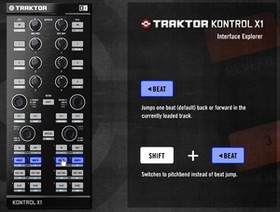
HARDWARE DETAILS


TRAKTOR KONTROL X1 stands out with exceptionally high quality workmanship. With meticulous attention to detail, the knobs and buttons have been designed for maximum accuracy and precision in both look and feel.
With its slim, yet super-sturdy construction, the X1 is your companion in any DJing situation. The optional transport bag not only serves to securely transport the unit, but can be turned into a stand that puts X1 at exactly the same height as standard mixers and other DJ hardware.

TRAKTOR KONTROL X1 features a total of 30 buttons, 4 push encoders and 8 knobs arranged in the following sections:
1. EFFECTS SECTION
8 high resolution potentiometers and 8 buttons make up the effect section of TRAKTOR KONTROL X1. This section allows control of all the parameters of 2 TRAKTOR effect units simultaneously. In Chained mode, this means simultaneous control over 3 effects per deck. The effects section buttons are programmed to give direct access to 3 of your favorite effect presets.
2. BROWSE SECTION
One push encoder per deck is dedicated to browsing through play lists and loading tracks. Simply turn the push encoder to find the track you want, and push it to load it into the corresponding deck. Once the track is loaded the same encoders seek through the track, using tempo sync'd beat jumps to remain in time.
3. LOOP SECTION
This section allows for intuitive control of TRAKTOR's loop function, giving clear visual feedback about the loop status via LEDs. The section offers first level access to auto loops and manual loops as well as loop editing functions such as loop size and loop position, both coarse and fine.
4. TRANSPORT SECTION
This section provides direct access to basic playback controls as well as shifted access to 8 secondary functions for each deck. All buttons for industry standard workflows (Play, Sync, Cue + Cup) are located here. Switch to hotcue mode and you get another 16 buttons for controlling the 8 hot cues or hot loops per track. Plus, the CUP button flashes in time with the deck's BPM as an added visual mix aid.

The following interactive application describes all control elements in detail:
Open interactive Interface Explorer...

- Seamlessly adjustable LED brightness adapts to any environment from bright daylight to the darkest club
- Button off glow for reading button labels in absolute darkness.
- All buttons feature backlights in multiple colors for ease of useFX buttons: orange. Transport buttons: blue MIDI mode: green. Shift + Hotcue buttons: white.
- Bi-directional communication with TRAKTOR using NHL (Native Hardware Library). The NHL protocol features resolution that is almot 4 times that of regular MIDI
- Calibration wizard precisely and individually defines mid-point of each knob
- The controller is pre-mapped by the makers of TRAKTOR, with the option to freely customize any individual part. Tweak the defaults or reconfigure the mapping entirely to your preferred workflow
- Included powerful MIDI configuration software provides templates for various applications and gives access to advanced features such as encoder step size, note up/down encoder messages and more
- Fully hot-pluggable in TRAKTOR. The X1 runs the instant you connect it to your computer with TRAKTOR running. If the USB connection is accidentally disconnected TRAKTOR continues to play unaffected. Simply plug the X1 back in and it's good to go again.
Groove Agent 3 - your unbeatable virtual drummer
Groove Agent 3 - your unbeatable virtual drummer
Groove Agent 3 ist die dritte Version von Steinbergs Groove Agent und ein großer Schritt in der Evolution des virtuellen Drummers. Groove Agent 3 bietet nunmehr nicht nur einen, sondern gleich drei unterschiedliche Studiodrummer - für mehr Sounds, mehr Grooves und noch mehr kreative Möglichkeiten. Zusätzlich zum klassischen Groove Agent Modul kommt die Version 3 mit zwei komplett neuen „Agents“ daher: Special Agent und Percussion Agent. Der Special Agent stellt Ihnen einen atemberaubend realistischen Studiodrummer inklusive neuer akustischer Drumsets zur Verfügung, während der Percussion Agent auf erstklassige Percussion Grooves spezialisiert ist. Mit dem neuen Dual Mode lassen sich sogar zwei der drei Agents gleichzeitig ins Recording-Studio bitten – für eine virtuelle Drum- und Percussion-Session der Extraklasse.
musicplace.ch - Das Musikhaus im Internet! Gitarren, Schlagzeuge, Keyboards, Studio-Equipment, DJ-Equipment, Mikrofone, Mischpulte, Musiksoftware, Beschallungsanlagen, Licht, usw.
Groove Agent 3 ist die dritte Version von Steinbergs Groove Agent und ein großer Schritt in der Evolution des virtuellen Drummers. Groove Agent 3 bietet nunmehr nicht nur einen, sondern gleich drei unterschiedliche Studiodrummer - für mehr Sounds, mehr Grooves und noch mehr kreative Möglichkeiten. Zusätzlich zum klassischen Groove Agent Modul kommt die Version 3 mit zwei komplett neuen „Agents“ daher: Special Agent und Percussion Agent. Der Special Agent stellt Ihnen einen atemberaubend realistischen Studiodrummer inklusive neuer akustischer Drumsets zur Verfügung, während der Percussion Agent auf erstklassige Percussion Grooves spezialisiert ist. Mit dem neuen Dual Mode lassen sich sogar zwei der drei Agents gleichzeitig ins Recording-Studio bitten – für eine virtuelle Drum- und Percussion-Session der Extraklasse.
- Neues Special Agent Live-Drummer Modul
- Neues Percussion Agent Modul mit 8 Gruppen Percussion Grooves
- Dual Mode: Zwei Agents spielen Seite an Seite im gleichen VST-Instrument
- Mehr Kits und Sounds, darunter drei erstklassige neue Drumsets
- 42 brandneue Groove Agent Styles, 123 Styles insgesamt
- Flexible Sample Import Funktion (wav/AIFF) zum Erstellen eigener Kits
- Neue Effektsektion inklusive 9-Band EQ und Kompressor
- Neue nützliche Funktionen wie Alternating Hits und Auto Fill
musicplace.ch - Das Musikhaus im Internet! Gitarren, Schlagzeuge, Keyboards, Studio-Equipment, DJ-Equipment, Mikrofone, Mischpulte, Musiksoftware, Beschallungsanlagen, Licht, usw.
Sequel 2 - Music Creation and Performance
Sequel 2 - Music Creation and Performance
Steinberg Sequel 2 ist der ideale Einstieg in die Musikproduktion am Computer. Das kostengünstige All-In-One-Musikstudio kombiniert intuitive Werkzeuge für Recording, Editing, Mixing und Live-Performance mit einer gigantischen Sammlung erstklassiger Loops und Sounds. Die über 5000 professionell produzierten Loops und mehr als 600 spielfertigen Sounds sind ein perfekter Grundstock für nahezu jeden aktuellen Musikstil. Hinzu kommen hochwertige Effekte und die gleiche State-of-The-Art Audio Engine wie Steinbergs High End Software. Sequel 2 eignet sich perfekt für alle PC und Mac User, die schnell und ohne Vorkenntnisse ihre eigene Musik produzieren und live performen möchten. Denn Sequel 2 bietet Spaß beim Musikmachen - vom ersten Moment an.
Features
musicplace.ch - Das Musikhaus im Internet! Gitarren, Schlagzeuge, Keyboards, Studio-Equipment, DJ-Equipment, Mikrofone, Mischpulte, Musiksoftware, Beschallungsanlagen, Licht, usw.
Steinberg Sequel 2 ist der ideale Einstieg in die Musikproduktion am Computer. Das kostengünstige All-In-One-Musikstudio kombiniert intuitive Werkzeuge für Recording, Editing, Mixing und Live-Performance mit einer gigantischen Sammlung erstklassiger Loops und Sounds. Die über 5000 professionell produzierten Loops und mehr als 600 spielfertigen Sounds sind ein perfekter Grundstock für nahezu jeden aktuellen Musikstil. Hinzu kommen hochwertige Effekte und die gleiche State-of-The-Art Audio Engine wie Steinbergs High End Software. Sequel 2 eignet sich perfekt für alle PC und Mac User, die schnell und ohne Vorkenntnisse ihre eigene Musik produzieren und live performen möchten. Denn Sequel 2 bietet Spaß beim Musikmachen - vom ersten Moment an.
Features
- Komplettes All-In-One Musikstudio – sofort Musik produzieren ohne Vorkenntnisse
- Aufnehmen, Bearbeiten und Abmischen von Musik in jedem aktuellen Musikstil
- Mehr als 5000 Loops für aktuelle Musikrichtungen wie Hip-Hop und R&B (mehr als 1000), Dance und Electronic (mehr als 1000), Pop (mehr als 500), Metal, World u.v.m.
- Über 600 sofort einsetzbare Instrumenten-Sounds, darunter über 60 Drum-Kits für unterschiedliche Musikstile
- Fantastischer Live-Performance Mode zum intuitiven Erstellen von Remixen und Live-Sets
- Einzigartige Kombination von linearem und Pattern-basiertem Arrangieren
- Audio-Loops und Instrumenten-Parts passen sich automatisch an Tempo und Tonart des Songs an
- Integrierte Effekte in Studio-Qualität, inklusive EQ und Dynamics in jedem Mischpultkanal
- Mehr als 50 Spur-Presets für verschiedene Instrumententypen und Vocals
- kompatibel mit Windows und Mac OS X Universal Binary
- Controller Mode - Steuerung wichtiger Parameter mit beinahe jedem MIDI-Controller oder -Keyboard (einfache Zuweisung per MIDI Learn)
- Live-Performance ohne Mausklicks - Antriggern von Live-Pads mit Keyboard oder Controller
- Virtual Keyboard - Einspielen von Melodien, Akkorden oder Drums auf der Computer-Tastatur
- Individuelle Track Icons – mehr Übersicht bei komplexen Projekten
- Track Freeze – „Einfrieren“ von Spuren spart Rechenleistung und erlaubt das Verwenden von noch mehr virtuellen Instrumenten und Effekten
- Verbesserter Sample-Editor – mehr kreative Möglichkeiten mit Free Warp und Audio Reverse
- Tap Tempo Funktion für Tempo-Bestimmung von Audiomaterial und Festlegen des Songs-Tempos
- Optimierte MediaBay mit noch leichterer Handhabung und besserer Übersicht
- Vista Core Audio Unterstützung - geringe Latenz unter Windows Vista auch ohne ASIO-Treiber
- Soundlibrary erweiterbar mit Sequel Content Sets für verschiedene Musikstile
musicplace.ch - Das Musikhaus im Internet! Gitarren, Schlagzeuge, Keyboards, Studio-Equipment, DJ-Equipment, Mikrofone, Mischpulte, Musiksoftware, Beschallungsanlagen, Licht, usw.
M-AUDIO Axiom Pro 61 - Keyboard
| |||
 | |||
Das M-Audio Axiom Pro 61 Controllerkeyboard basiert auf dem viel gepriesenen Axiom 61. Das kompakte Gerät ist mit TruTouch™ und der eigens entwickelten HyperControl™ MIDI-Mapping-Technologie und anderen innovativen Verbesserungen ausgestattet. HyperControl koppelt die 65 Regler des Keyboards automatisch an die am häufigsten benutzten Parameter in Pro Tools®, Cubase, Logic, Reason und anderen Workstations und Software-Instrumenten. Durch diese ständige Verbindung mit der Host-DAW sind die Regler des Keyboards stets synchron mit den aktiven Parametern Ihrer Software. Auf dem intuitiven LC-Display werden die Werte ständig aktualisiert; das erlaubt ein nahtloses Editing und verhindert Parametersprünge, sogar wenn Plug-ins geschlossen werden. Sofort-Umschalten zwischen Mixer- und Instrument-Control-Modus: Buttons zuweisen, um QWERTY-Befehle direkt vom Axiom Pro 61 zu senden. Speichern Sie Ihre Einstellungen in 50 Speicherplätzen, jeder mit vier Profilen für ein schnelles Aufrufen über das LC-Display. Sie können Ihre gesamte Session nun über das Axiom Pro 61-Keyboard steuern. Verbesserte Integration in Ihre DAW mit HyperControl-Technologie Dank der revolutionären M-Audio HyperControl-Technologie koppelt sich Ihr Axiom Pro 61-Controller automatisch an die am meisten verwendeten Parameter der gängigsten Software-Instrumente und digitalen Audio-Workstations wie Pro Tools, Cubase, Logic und Reason*. HyperControl aktualisiert die Zuweisungen der einzelnen Regler Ihres virtuellen Instruments oder die Track Parameter in Echtzeit, während Sie arbeiten: Einfacher geht es nicht. Der HyperControl-Unterschied Auch andere Controller lassen sich einzelnen Reglern zuweisen, doch nur die M-Audio Axiom Pro-Reihe verfügt über die HyperControl-Technologie. HyperControl synchronisiert Axiom Pro mit Ihrer DAW, so dass Ihre Hard- und Software wie eine Einheit zusammenarbeiten. Die Technologie verwendet das LC-Display des Axiom Pro 61, um Software-Regler modular zu gruppieren. Ähnliche Regler werden gruppiert und können über vier dedizierte Soft-Tasten angesprochen werden, die ständig entsprechend den zugewiesenen Parametern aktualisiert werden. Mit einem dedizierten Button schalten Sie zwischen dem Mixer- und dem Instrumenten-Modus um, und haben so unmittelbaren Zugriff auf sämtliche Funktionen Ihrer Software. Die dedizierten Track-Buttons erlauben sequentielles Navigieren in Ihrem Mixer und die sofortige Zuweisung von Software-Instrumenten in dem ausgewählten Track. Sie können die Software-Instrumente sogar ansteuern, ohne sie zu öffnen. DAW-Transport und Track-Navigation Mit den sechs dedizierten Transport-Buttons des Axiom Pro 61-Controllers haben Sie direkten Zugriff auf sämtliche Wiedergabe- und Aufnahme-Regler Ihrer DAW. Im Gegensatz zu anderen "Alles-oder-Nichts-Systemen" verfügt Axiom Pro 61 auch über einen exklusiven Transport-Modus. Diese Option erlaubt Ihnen den Zugriff auf die Transport-Funktion und Track-Navigation Ihrer DAW über die HyperControl-Technologie und gibt Ihnen die Möglichkeit, Ihre eigenen MIDI-Zuweisungen für die Trigger-Pads, Buttons, Slider und Encoder einzurichten. Expressives Spiel Der Axiom Pro 61-Controller ist leicht, fühlt sich gut an und setzt Ihrer Kreativität keine Grenzen. Die M-Audio TruTouch™-Tastatur vereint professionelle halbgewichtete Tasten mit einer sehr schnellen Tastaturabtastung, die Ihnen eine hohe Ausdrucksstärke ermöglicht, die durch zuweisbaren Aftertouch abgerundet wird. Der ultimative Pro Tools-Keyboard-Controller Ob Sie mit einem Pro Tools M-Powered™, einem Pro Tools LE® oder dem Pro Tools|HD®-System arbeiten, die Axiom Pro MIDI-Controller setzen neue Maßstäbe in der Keyboardsteuerung: Durch die fortschrittliche M-Audio HyperControl-Technologie haben Sie unmittelbaren Zugriff auf sämtliche Pro Tools-Parameter, einschließlich Mixer- und Trackfunktionen sowie eine beispiellose Kontrolle Ihrer virtuellen Instrumente wie Xpand!, Strike und Hybrid. Neue Befehle Die Controller der Axiom Pro-Keyboardreihe sind die ersten, die MIDI-Steuerung über ASCII-Tastaturbefehle anbieten. Sie können jedem Button des Axiom Pro 61 ASCII-Befehle zuweisen, wie sie sie von der QWERTY-Tastatur für Ihre Host-DAW kennen. Stellen Sie sich die Möglichkeiten mit den Tastaturbefehlen Kopieren, Einfügen, Duplizieren, Neuer Track, usw. vor, die Sie den Buttons zuweisen können. Umfassende MIDI-Kontrolle Axiom Pro 61 verfügt über satte 65 MIDI-zuweisbare Regler, über die Sie Ihre gesamte Session von einem Ort aus steuern können. Über die acht anschlagdynamischen Trigger-Pads mit der viel gepriesenen Trigger Finger-Technologie von M-Audio können Sie Drum-Tracks einspielen und Loops und Samples triggern. Stellen Sie die Filter, EQ und Panning unmittelbar über die acht Drehregler ein. Die neun 40mm-Slider (die jeweils mit einem zuweisbaren Button ausgestattet sind) verfügen über eine Auto-Mute-Funktion, um Sprünge zu vermeiden: Optimal für die Steuerung Ihrer Mixe, virtueller Orgel-Drawbars und anderen Funktionen. In dem umfangreichen Reglerangebot des Keyboards sind auch 12 voll zuweisbare Buttons, einen Data/Oktav-Button, Pitchbend- und Modulationsräder, Aftertouch und zweifach zuweisbare Pedalanschlüsse enthalten. Neben einem USB-Anschluss stehen Ihnen auch MIDI-Eingänge und -Ausgänge zur Verfügung, um externe MIDI-Geräte anzuschließen. Total Recall Das Axiom Pro 61-Keyboard verfügt über 50 Speicherplätze, jeder mit vier Schnellzugriff-Profilen Ihrer Reglerzuweisungen, so dass Sie schnell, einfach und flexibel Ihre eigene Preset-Sammlung erstellen und organisieren können. |


musicplace.ch - Das Musikhaus im Internet! Gitarren, Schlagzeuge, Keyboards, Studio-Equipment, DJ-Equipment, Mikrofone, Mischpulte, Musiksoftware, Beschallungsanlagen, Licht, usw.
Subscribe to:
Posts (Atom)